Category: SDK & Developer

  • What Is an Offerwall SDK? A Developer’s Complete Guide (2026)

    What Is an Offerwall SDK? A Developer’s Complete Guide (2026)

    What Is an Offerwall SDK? A Developer’s Complete Guide (2026)

    offerwall SDK offerwall SDK integration best offerwall SDK offerwall SDK for Android

    Monetizing free-to-play mobile games and apps has evolved far beyond simple banner ads. In 2026, the most effective monetization strategies put the user in control — and the offerwall SDK is the technology that makes this possible. If you’ve ever wondered what is offerwall SDK technology, how it works under the hood, or how to choose the right one for your app, this guide covers everything you need to know.

    For a broader introduction to the concept, see our foundational article: What Is an Offerwall?. This guide goes deeper — into the SDK architecture, integration patterns, security, and performance considerations that developers care about.

    1. What Is an Offerwall SDK? Technical Definition

    An offerwall SDK is a software development kit — a bundled library of code, APIs, and UI components — that developers embed into a mobile application or game to display an in-app offerwall. The offerwall is a dedicated interface where users can browse and complete tasks (surveys, app installations, video views, sign-ups, game milestones) in exchange for virtual currency, premium features, or other in-app rewards.

    From a technical standpoint, an offerwall SDK is not a single monolithic block. It is a collection of interconnected modules:

    • Network layer: Handles HTTP/HTTPS communication with the offerwall platform’s backend, including offer catalog retrieval, impression tracking, and reward callbacks.
    • UI rendering engine: Renders the offerwall interface — offer cards, filtering, sorting, search — as a native view or web overlay within the host app.
    • State management: Tracks which offers a user has clicked, started, or completed, and persists this state across app sessions.
    • Postback client: Sends and receives server-to-server (S2S) reward notifications, ensuring rewards are validated and delivered even if the user has closed the app.
    • Analytics & telemetry: Collects impression, click, and completion data for reporting dashboards.

    The SDK abstracts away the complexity of communicating with dozens of advertiser networks, offer aggregators, and attribution providers. Instead of integrating each ad network individually, the developer integrates one SDK and gets access to a unified offer catalog.

    Think of an offerwall SDK as a bridge: on one side, your app and your users; on the other, a global marketplace of advertisers willing to pay for user actions. The SDK manages the traffic on that bridge — fetching offers, presenting them, tracking completions, and delivering rewards.

    2. How Offerwall SDKs Work Under the Hood

    Understanding the internal flow of an offerwall SDK helps you debug issues, optimize performance, and make informed architecture decisions. Here is the end-to-end lifecycle of a single offer completion:

    Step 1: SDK Initialization

    When your app launches, the SDK initializes with your publisher API key and a unique user identifier. The SDK registers itself with the platform’s backend, exchanging configuration data — device type, OS version, app version, locale, country code — that determines which offers are eligible for this user.

    Step 2: Offer Catalog Fetch

    The SDK requests the offer catalog from the platform’s API. The backend queries its database of advertiser campaigns, filters by targeting criteria (geo, device, demographics), and returns a ranked list of offers. The SDK caches this list locally with a TTL (time-to-live), typically 15–30 minutes, to reduce network calls.

    Step 3: Offer Display & User Interaction

    When the user opens the offerwall (e.g., by tapping a “Free Rewards” button), the SDK renders the cached offers as interactive cards. Each card shows the reward amount, task description, and a call-to-action. When the user taps an offer, the SDK fires a click-tracking event and redirects the user to the advertiser’s destination (app store listing, survey page, etc.).

    Step 4: Attribution & Completion Tracking

    The advertiser’s platform tracks the user’s progress. When the user completes the required action — installs an app, reaches level 10 in a game, finishes a survey — the advertiser fires a completion event back to the offerwall platform via a server-to-server postback.

    Step 5: Reward Validation & Delivery

    The offerwall platform validates the completion (checking for fraud, duplicates, and eligibility), then sends a postback to your server with the reward details: user ID, offer ID, reward amount, and a cryptographic signature. Your server verifies the signature, credits the user’s balance, and optionally notifies the client via a push notification or polling mechanism.

    This flow is covered in more detail in our Offerwall SDK Integration Guide 2026.

    3. Core Components: Initialization, Offer Fetching, Reward Display, Postback

    Every offerwall SDK, regardless of vendor, is built around four core components. Understanding each one is essential for a smooth integration.

    3.1 Initialization

    Initialization is the first call your app makes to the SDK. It typically requires:

    • Publisher API key: Identifies your app on the platform.
    • User ID: A unique identifier for the current user (your internal ID, not a device ID).
    • Configuration options: Test mode flag, logging level, custom parameters.
    // Android (Kotlin) — Perkox SDK initialization
    Perkox.initialize(
        apiKey = "YOUR_API_KEY",
        userId = "user_12345",
        config = PerkoxConfig(
            testMode = false,
            logLevel = LogLevel.INFO
        )
    )

    Best practice: initialize the SDK as early as possible in your app’s lifecycle (e.g., in Application.onCreate() for Android or application(_:didFinishLaunchingWithOptions:) for iOS) so offers are pre-fetched before the user opens the offerwall.

    3.2 Offer Fetching

    Once initialized, the SDK fetches offers from the backend. The fetch request includes targeting parameters — country, device type, OS version — and the backend responds with a JSON payload of offers. The SDK parses this into native offer objects and caches them.

    Key considerations:

    • Caching strategy: The SDK should cache offers locally to avoid re-fetching on every offerwall open. Look for SDKs with configurable cache TTLs.
    • Background pre-fetching: The best SDKs pre-fetch offers during initialization so the offerwall opens instantly.
    • Pagination: For large offer catalogs, the SDK should support pagination or lazy loading to avoid loading hundreds of offers at once.

    3.3 Reward Display

    The reward display component renders the offerwall UI. Two approaches exist:

    • Native UI: The SDK provides pre-built native views (Android Views, iOS UIViews) that you present as a full-screen activity or modal. This offers the best performance and user experience.
    • WebView overlay: The SDK loads a server-rendered HTML offerwall in a WebView. This is simpler to maintain (the vendor can update the UI without an SDK release) but has a slight performance overhead.

    Modern SDKs like Perkox use a hybrid approach: a native container with a WebView for the offer list, giving the best of both worlds — native navigation with server-side UI flexibility.

    3.4 Postback (Server-to-Server Callback)

    The postback is the most critical component for reward integrity. When a user completes an offer, the platform sends an HTTP request to your server endpoint with the reward details. A typical postback payload looks like:

    {
      "user_id": "user_12345",
      "offer_id": "offer_9876",
      "offer_name": "Reach Level 10 in Game X",
      "reward_amount": 250,
      "reward_currency": "coins",
      "transaction_id": "txn_abc123def456",
      "signature": "hmac_sha256_signature_here",
      "timestamp": "2026-08-25T14:30:00Z"
    }

    Your server must:

    1. Verify the HMAC signature to confirm the postback is genuine.
    2. Check the transaction_id for duplicates (idempotency).
    3. Credit the user’s reward balance.
    4. Respond with HTTP 200 to acknowledge receipt.

    This server-side validation flow is critical for fraud prevention. Read our deep dive: Server-Side Reward Validation & Offerwall Fraud Prevention.

    4. SDK Architecture: Client-Side vs Server-Side Components

    An offerwall SDK is not purely client-side. The full architecture spans both the mobile app (client) and the publisher’s backend server. Understanding this split is crucial for a robust integration.

    Client-Side Components

    Everything that runs inside your app:

    • SDK library: The compiled binary (AAR for Android, framework for iOS) linked into your app.
    • Offerwall UI: The rendered offer list and offer detail views.
    • Local cache: On-device storage for offers, user state, and session data.
    • Click & impression trackers: Lightweight events fired to the platform’s analytics endpoint.
    • SDK configuration: API key, test mode, user ID — all managed client-side.

    Server-Side Components

    Everything that runs on your backend or the platform’s backend:

    • Postback receiver endpoint: Your server’s URL that receives reward callbacks. This is the single most important server-side component.
    • Signature verification logic: Server-side HMAC validation using your secret key.
    • Reward ledger: Your database table or service that tracks credited rewards per user.
    • Idempotency store: A record of processed transaction_id values to prevent duplicate crediting.
    • Platform backend (vendor-side): The offerwall provider’s infrastructure that manages advertiser relationships, offer catalog, attribution, and postback dispatch.

    Why the Split Matters

    The client-side SDK handles presentation and user interaction. The server-side components handle trust and reward integrity. Rewards should never be credited based on client-side events alone — a user could spoof a completion event. Always rely on server-to-server postbacks with cryptographic signatures for reward crediting.

    This dual architecture means your integration plan must cover both sides: the client SDK integration (adding the dependency, initializing, presenting the UI) and the server integration (building the postback endpoint, implementing signature verification, managing the reward ledger).

    5. Security Features: Server-Side Validation & Fraud Prevention

    Security is the area where offerwall SDKs differ most dramatically. A poorly designed SDK can expose your app to reward fraud, duplicate crediting, and revenue leakage. Here are the security features you should demand from any offerwall SDK in 2026:

    5.1 Server-Side Reward Validation

    The cornerstone of offerwall security. When a user completes an offer, the platform sends a postback to your server — not to the client. Your server verifies the postback’s authenticity using an HMAC-SHA256 signature computed with a secret key shared between you and the platform. Only postbacks with valid signatures are processed.

    This prevents:

    • Client-side spoofing: A malicious user cannot fabricate a completion event because they don’t have the secret key.
    • Man-in-the-middle attacks: The signature ensures the postback hasn’t been tampered with in transit.

    5.2 Idempotency & Duplicate Prevention

    Postbacks can be retried (network failures, timeouts). Without idempotency, a retried postback would credit the user twice. Every postback includes a unique transaction_id. Your server must store processed transaction IDs and skip duplicates.

    // Pseudocode: idempotent postback handler
    if (processedTransactions.contains(txn.transaction_id)) {
        respond(200, "Duplicate — already processed")
        return
    }
    creditUser(txn.user_id, txn.reward_amount)
    processedTransactions.add(txn.transaction_id)
    respond(200, "OK")

    5.3 Device Fingerprinting

    Advanced SDKs collect device fingerprints — a combination of hardware identifiers, OS version, screen resolution, and behavioral signals — to detect suspicious patterns. If the same device completes an unusual number of offers in a short time, the platform can flag or block the activity.

    5.4 Offer Completion Verification

    The platform doesn’t take the user’s word for completion. It relies on advertiser-side attribution: the advertiser’s SDK or attribution provider confirms that the user actually installed the app, reached the required level, or completed the survey. This cross-verification happens server-side before the postback is sent.

    5.5 IP & Geo Validation

    Postbacks include the user’s IP address and geo-location. Your server can validate that the IP matches the expected region for the offer, flagging VPN/proxy traffic that might indicate fraud.

    5.6 Rate Limiting & Anomaly Detection

    The best platforms implement server-side rate limiting and anomaly detection. If a single user ID receives an abnormally high number of postbacks in a short window, the system can throttle or flag the account for manual review.

    For a comprehensive treatment of these topics, read our Server-Side Reward Validation & Offerwall Fraud Prevention guide.

    6. Choosing an Offerwall SDK: 10 Factors to Evaluate

    Choosing the best offerwall SDK for your app is a decision that affects your revenue, user experience, and engineering velocity. Here are the 10 most important factors to evaluate:

    1. eCPM & Revenue Share: What is the effective cost per mille (eCPM) you can expect? What percentage of advertiser spend does the platform pass through to you? Look for transparent pricing and published revenue share ratios.
    2. Offer Fill Rate: A high eCPM means nothing if there are no offers for your users. Evaluate the platform’s fill rate across your target geos — especially Tier 2 and Tier 3 countries where fill rates often drop.
    3. SDK Size & Method Count: The SDK adds to your app’s binary size. A bloated SDK (10+ MB) can hurt your app’s install conversion rate. Look for SDKs under 2 MB with a low method count (important for Android’s 65K method limit on older DEX formats).
    4. Integration Complexity: How long does it take to integrate? The best SDKs can be integrated in under 30 minutes with minimal boilerplate. Check for clear documentation, code samples, and migration guides.
    5. Server-Side Validation Support: Does the SDK support S2S postbacks with HMAC signatures? This is non-negotiable for reward integrity. Avoid any SDK that only supports client-side reward callbacks.
    6. Platform Coverage: Does the SDK support all your target platforms? If you’re building for Android, iOS, Unity, and React Native, you need an offerwall SDK for Android and equivalent wrappers for the others. Check that all platform SDKs are maintained and up to date.
    7. Documentation Quality: Is the documentation comprehensive, current, and developer-friendly? Look for API references, integration tutorials, troubleshooting guides, and changelogs. Poor documentation will cost you hours of engineering time.
    8. Fraud Prevention: What anti-fraud measures does the platform implement? Look for device fingerprinting, IP validation, duplicate detection, and anomaly detection. Ask the vendor about their fraud rate and how they handle disputed completions.
    9. Dashboard & Analytics: Does the platform provide a real-time dashboard with revenue, impressions, clicks, completion rates, and eCPM by geo and by offer? Granular reporting helps you optimize placement and targeting.
    10. Developer Support: What support channels are available? Look for email, chat, and a dedicated account manager. Check response time SLAs and whether the vendor provides integration assistance.

    7. SDK Performance Impact: What to Measure

    Adding any third-party SDK to your app has a performance cost. A well-designed offerwall SDK minimizes this cost, but you should measure these metrics before and after integration:

    7.1 App Binary Size

    Measure the delta in your APK/AAB (Android) or IPA (iOS) size after adding the SDK. A well-optimized SDK should add less than 2 MB. If the delta is larger, investigate whether the SDK includes unnecessary dependencies or assets.

    7.2 App Launch Time

    SDK initialization runs during app startup. Measure cold start time with and without the SDK. The initialization should be asynchronous and non-blocking — if it adds more than 100ms to cold start, consider deferring initialization to a background task.

    7.3 Memory Footprint

    Monitor the SDK’s memory usage using Android Profiler or Xcode Instruments. The SDK should release memory when the offerwall is closed, not hold onto cached data indefinitely. Look for memory leaks, especially in WebView-based implementations.

    7.4 Network Usage

    Track the SDK’s network requests: frequency, payload size, and timing. The SDK should batch requests where possible, use compression (gzip), and avoid polling. Pre-fetching offers is good, but constant background polling drains battery and data.

    7.5 Battery Impact

    Use the Android Battery Historian or iOS Energy Log to measure the SDK’s contribution to battery drain. The offerwall should be idle (no network activity) when not visible. Background pre-fetching should be infrequent and bounded.

    7.6 UI Responsiveness

    When the offerwall opens, it should render in under 500ms. If it takes longer, users will abandon it. Measure the time from the “show offerwall” call to first offer card appearing on screen. Pre-fetching and local caching are the primary levers for reducing this latency.

    7.7 Crash Rate

    Monitor your crash reporting (Crashlytics, Sentry) for SDK-related crashes. A high-quality SDK should have a crash-free rate of 99.9%+ in your app. Watch for NullPointerExceptions, WebView crashes, and threading issues.

    8. Common SDK Integration Challenges and Solutions

    Even with a well-documented SDK, integration can hit snags. Here are the most common challenges developers face and how to solve them:

    Challenge 1: Postback Not Receiving

    Symptom: Users complete offers but your server never receives the postback.

    Solution: Check that your postback URL is correctly configured in the platform dashboard. Ensure your endpoint is publicly accessible (not behind a VPN or firewall). Test with the platform’s postback simulator. Verify that your server returns HTTP 200 — if it returns an error code, the platform will retry, but persistent failures will stop retries.

    Challenge 2: Duplicate Rewards

    Symptom: Users are credited twice for the same offer completion.

    Solution: Implement idempotency using the transaction_id field. Store every processed transaction ID in a database with a unique constraint. Before crediting, check if the transaction ID already exists. This is a server-side fix — the SDK cannot prevent duplicates on its own.

    Challenge 3: Offerwall Opens Empty

    Symptom: The offerwall UI loads but shows no offers.

    Solution: This usually means no offers match the user’s targeting criteria (geo, device, OS version). Check the user’s country code and device profile. If you’re in test mode, ensure test offers are enabled. Contact the platform’s support if the issue persists for a specific geo.

    Challenge 4: WebView Crashes or Blank Screen

    Symptom: The offerwall WebView crashes or shows a blank white screen.

    Solution: Ensure WebView is enabled in your app’s manifest/configuration. On Android, check that android.webkit.WebView is not disabled and that JavaScript is enabled. On iOS, verify that WKWebView has the correct configuration and that App Transport Security (ATS) allows HTTPS connections to the platform’s domains.

    Challenge 5: Signature Verification Fails

    Symptom: Your server rejects postbacks because the HMAC signature doesn’t match.

    Solution: Ensure you’re using the correct secret key (not the API key) for HMAC computation. Verify that you’re computing the HMAC over the exact postback body (including whitespace and field order). Check for encoding issues — the signature should be computed over the raw request body bytes, not a re-serialized JSON string.

    Challenge 6: SDK Initialization Fails on Older Devices

    Symptom: The SDK throws an error during initialization on older Android or iOS versions.

    Solution: Check the SDK’s minimum OS version requirements. If your app supports older versions, guard the SDK initialization with a version check and gracefully skip offerwall functionality on unsupported devices.

    9. Offerwall SDK Comparison: Perkox vs Competitors

    To help you choose the best offerwall SDK, here’s a head-to-head comparison of Perkox against typical competitors in the market. For a broader platform comparison, see our Best Offerwall Platforms 2026: Complete Comparison.

    Feature Perkox Typical Competitor A Typical Competitor B
    SDK Size (Android) ~1.2 MB ~3.5 MB ~2.8 MB
    Integration Time < 20 min 45–60 min 30–45 min
    Server-Side Postback Yes (HMAC-SHA256) Yes (MD5 only) Limited
    Idempotency Support Built-in (transaction_id) Manual Manual
    Offer Pre-Fetch Yes (on init) On demand only Yes (on init)
    Android SDK Gradle / Maven Gradle / Maven Manual AAR download
    iOS SDK CocoaPods + SPM CocoaPods only CocoaPods only
    Unity Wrapper Yes Yes No
    React Native Wrapper Yes No No
    Fraud Detection Device fingerprint + IP + anomaly IP only Basic
    Documentation Comprehensive + live examples Adequate Minimal
    Developer Support Email + chat + dedicated manager Email only Email (48h response)
    Dashboard Analytics Real-time, granular Delayed (24h) Real-time
    Revenue Share Transparency Full transparency Opaque Partial

    Why developers choose Perkox: The Perkox SDK is built developer-first. The offerwall SDK for Android weighs just ~1.2 MB, integrates in under 20 minutes, and includes robust server-side validation with HMAC-SHA256 signatures out of the box. The platform supports Unity and React Native wrappers, real-time analytics, and a transparent revenue share model. Fraud prevention is multi-layered — device fingerprinting, IP/geo validation, and anomaly detection — giving publishers confidence that their reward economy is protected.

    10. FAQ

    What is an offerwall SDK?

    An offerwall SDK is a software development kit that allows mobile app and game developers to embed an in-app offerwall — a UI surface presenting tasks like surveys, app downloads, or video views — that users complete in exchange for virtual rewards. The SDK handles offer fetching, display rendering, reward tracking, and server-side postback communication.

    How does offerwall SDK integration work?

    Offerwall SDK integration involves adding the SDK dependency to your project (via Gradle for Android or CocoaPods/SPM for iOS), initializing the SDK with your API key and user ID, calling the method to present the offerwall UI, and implementing a server-side postback endpoint to receive and validate reward callbacks. Most SDKs can be integrated in under 30 minutes.

    What is the best offerwall SDK in 2026?

    The best offerwall SDK depends on your priorities — eCPM rates, fill rate, integration simplicity, server-side validation quality, and developer support. Perkox is widely regarded as the developer-first choice in 2026 due to its lightweight SDK (~1.2 MB), robust server-to-server postback system, and comprehensive documentation.

    Is an offerwall SDK safe to use in my app?

    Yes, when you choose an SDK with server-side reward validation, fraud detection, and compliance with store policies (Google Play and App Store). Reputable SDKs like Perkox implement signature-based postback verification, device fingerprinting, and duplicate reward prevention to protect both developers and users.

    Can I use an offerwall SDK for Android and iOS?

    Yes. Modern offerwall SDKs including Perkox provide separate native SDKs for Android and iOS, as well as Unity and React Native wrappers. The offerwall SDK for Android is distributed via Maven/Gradle, while the iOS version is available through CocoaPods or Swift Package Manager.

    Ready to Monetize Your App with Perkox?

    Integrate the developer-first offerwall SDK in under 20 minutes. Lightweight, secure, and built for performance.

    👉 Get Started with Perkox — Sign Up Free
    📚 Read the Full SDK Documentation

    Related Resources


    Published August 25, 2026 by Perkox. This guide is part of our developer documentation series on offerwall SDK integration, security, and monetization best practices.

  • Mobile App Monetization Strategies 2026: The Complete Guide for Developers

    Mobile App Monetization Strategies 2026: The Complete Guide for Developers

    Mobile App Monetization Strategies 2026: The Complete Guide for Developers

    Updated August 2026 — covering ATT, SKAdNetwork 4.0+, hybrid models, and revenue benchmarks by app category.

    Mobile app monetization in 2026 looks nothing like it did five years ago. The days of bolting a banner ad onto a free app and calling it a business are over. Apple’s App Tracking Transparency (ATT) reshaped ad targeting, the subscription economy matured (and in some categories saturated), and the industry woke up to a hard truth: only about 5% of users ever make an in-app purchase. The other 95%? For most apps, they generate zero revenue.

    This guide breaks down every major app monetization strategy — in-app purchases, subscriptions, advertising, offerwalls, and hybrid combinations — with real revenue benchmarks, pros and cons, and practical implementation steps. Whether you’re launching your first app or optimizing a portfolio of 50, you’ll leave with a concrete plan for how to monetize an app in 2026.

    Table of Contents

    1. The App Monetization Landscape in 2026
    2. Revenue Models Compared
    3. Comparison Table: Pros and Cons
    4. Revenue Benchmarks by App Category
    5. How to Choose the Right Monetization Mix
    6. The 95% Problem: Why Most Users Never Pay
    7. Hybrid Monetization: IAP + Offerwall + Ads
    8. Privacy Changes: ATT, SKAdNetwork, and Their Impact
    9. Practical Steps to Implement Each Model
    10. FAQ

    1. The App Monetization Landscape in 2026

    Global mobile app revenue is on track to surpass $935 billion in 2026, with in-app purchases and subscriptions accounting for the majority of that total. But the composition of that revenue has shifted in ways that matter for every developer:

    • Ad revenue rebounded — but differently. Post-ATT, CPMs for generic banner ads remain depressed. Rewarded video, playable ads, and offerwall inventory now command the highest eCPMs because they’re consent-based and contextually relevant.
    • Subscriptions hit a ceiling in some categories. Subscription fatigue is real. Users in 2026 average 8–12 active paid subscriptions, and churn rates for non-essential apps climbed to 40–60% annually. App Store pricing changes (multi-availability, regional pricing) helped, but “subscribe to everything” is no longer a viable default.
    • Hybrid is the new default. The top-grossing 500 apps on iOS and Google Play overwhelmingly use two or more monetization methods. Pure-IAP games and pure-subscription utilities still exist, but they’re the exception, not the rule.
    • The offerwall went mainstream. Once a niche ad format for casual games, offerwalls now appear in utilities, finance apps, and even some productivity tools. They directly address the 95% problem by monetizing non-paying users with advertiser-funded rewards. (See our deep dive: What Is an Offerwall?)
    • Privacy and measurement keep evolving. SKAdNetwork (SKAN) is now on version 4.0+, and Google’s Privacy Sandbox for Android is rolling out in earnest. Identifier-based measurement is a legacy system, not the default.

    The takeaway: app monetization in 2026 is a portfolio problem, not a single-choice problem. You’re not picking one model. You’re assembling a mix that captures revenue from every user segment — payers, almost-payers, and never-payers alike.

    2. Revenue Models Compared

    Let’s examine the five core app monetization strategies in detail.

    In-App Purchases (IAP)

    Users buy virtual goods, cosmetics, level unlocks, premium features, or consumable currency. IAP dominates gaming (especially mid-core and hardcore) and is common in productivity apps that sell one-time “pro” unlocks.

    Best for: Games, apps with clear “premium” tiers, apps with consumable content.

    Revenue reality: Top-performing games see 15–25% of revenue from IAP “whales” (top 1% of spenders). But the long tail is brutal — 95%+ of users never convert. IAP requires scale: you need a large enough user base that the 5% who pay cover the 95% who don’t.

    Subscriptions

    Users pay a recurring fee (weekly, monthly, annual) for ongoing access. Apple and Google both take 15–30% cuts, with the 15% small-business rate available below $1M revenue. Subscriptions work when the app delivers continuing value — fresh content, ongoing utility, or cloud services.

    Best for: Media/streaming, productivity, health/fitness, finance, education.

    Revenue reality: Subscriptions offer the highest revenue-per-paying-user but face steep churn. Annual plans reduce churn 3–5x versus monthly. Free trials convert 15–40% to paid depending on category. The risk: if your app doesn’t deliver ongoing value, subscriptions create negative reviews and refund requests.

    Advertising

    Display ads — banner, interstitial, rewarded video, native, playable. Revenue depends on eCPM (earnings per thousand impressions) and fill rate.

    Best for: High-DAU apps, casual and hyper-casual games, free utilities.

    Revenue reality (2026 eCPMs):

    • Banner: $0.10–$0.50
    • Interstitial: $1–$5
    • Rewarded video: $5–$25 (highest, because consent-based)
    • Native: $0.50–$3

    Rewarded video is the clear winner — users opt in, eCPMs are high, and the format doubles as engagement. Banner ads are mostly a remnant; they pay little and hurt UX.

    Offerwalls

    An offerwall is an in-app storefront where users complete advertiser tasks (surveys, app installs, video views, sign-ups) to earn in-app rewards — currency, premium features, ad removal. The advertiser pays; the user gets value; the developer takes a revenue share (typically 70–90% of what the advertiser pays).

    Best for: Free-to-play games, apps with virtual economies, any app with a large non-paying user base.

    Revenue reality: Offerwalls typically generate $0.50–$3.00 per completing user and can lift total app revenue 15–40% when layered onto an existing IAP model. They’re the single most effective way to monetize the 95% who never buy IAP. (More: Offerwall + IAP: Monetize Non-Paying Users in 2026)

    Hybrid

    Combining two or more of the above. The dominant 2026 pattern: IAP for payers + rewarded video/offerwall for non-payers + subscriptions where recurring value exists. Hybrid isn’t just “more revenue” — it’s resilient revenue. If ATT or Privacy Sandbox dents one channel, the others compensate.

    3. Comparison Table: Pros and Cons of Each Model

    Model Revenue Potential Implementation Effort User Experience Impact Best For Key Risk
    In-App Purchases High (whale-driven) Medium Low if balanced Games, apps with virtual goods 95% never convert; depends on whales
    Subscriptions Very high per user Medium-High Medium (paywall friction) Content, productivity, finance Churn 40–60%; subscription fatigue
    Advertising (banner) Low Low High (intrusive) High-DAU free apps Low eCPMs, post-ATT targeting loss
    Rewarded Video Medium-High Low-Medium Low (opt-in) Casual games, utilities Frequency caps needed to avoid fatigue
    Offerwall Medium-High (per completer) Low (SDK integration) Low (opt-in, rewards users) Games, apps with non-paying base Quality of offers matters; fraud risk
    Hybrid Highest (diversified) High (multiple integrations) Low if sequenced well Most apps in 2026 Complexity; needs careful UX

    4. Revenue Benchmarks by App Category

    Numbers below are 2026 industry medians drawn from public earnings reports, ad-network benchmarks, and developer surveys. Use them as directional targets, not guarantees.

    Games

    • Hyper-casual: $0.10–$0.50 ARPDAU (almost entirely ad/offerwall)
    • Casual (match-3, puzzle): $0.20–$0.80 ARPDAU (hybrid: ads + IAP)
    • Mid-core (RPG, strategy): $1–$5 ARPDAU (IAP-dominant, offerwall for non-payers)
    • Hardcore (MMO, competitive): $3–$15 ARPDAU (IAP-dominant)
    • IAP conversion rate: 2–6% (category-dependent)

    Utilities

    • ARPDAU (ad-supported): $0.05–$0.30
    • Subscription ARPU (paying): $3–$8/month
    • Free-to-paid conversion: 1–5%
    • Offerwall lift: 15–25% incremental revenue

    Social / Communication

    • ARPDAU: $0.02–$0.15 (mostly ads; subscriptions rare)
    • Monetization challenge: High DAU, low willingness-to-pay; rewarded video and offerwalls are primary levers

    Finance / Fintech

    • Subscription ARPU: $5–$20/month (highest of any category)
    • Conversion to paid: 5–15% (strong intent audience)
    • Transaction-based revenue: Often layered on top (interchange, trading fees)
    • Offerwall use case: Emerging — used to incentivize account verification, KYC completion, or feature adoption

    Key insight: The gap between “best-paying 5%” and “non-paying 95%” is largest in games and utilities. That’s exactly where offerwalls and rewarded ads deliver the biggest lift. If your app is in those categories and you’re not using an offerwall, you’re leaving 15–40% of potential revenue on the table.

    5. How to Choose the Right Monetization Mix for Your App

    There’s no universal answer to “how to monetize an app” — but there is a repeatable decision framework. Work through these five questions:

    1. What is your user intent? Entertainment apps monetize differently than utility apps. Users open a game to be entertained (high engagement, low willingness to pay upfront). Users open a finance app to accomplish a task (lower frequency, higher willingness to pay). Match the model to intent.
    2. What is your DAU and session depth? High-DAU, short-session apps (casual games, social) favor ads and offerwalls. Low-DAU, high-value apps (finance, productivity) favor subscriptions and IAP.
    3. Do you have a virtual economy? If yes (games, apps with points/coins), IAP and offerwalls both work — they share the same reward plumbing. If no, you’re limited to subscriptions and ad formats that don’t require in-app currency.
    4. What’s your audience geography? Tier-1 markets (US, UK, Japan) convert to IAP and subscriptions at 3–5x the rate of emerging markets. Offerwalls, by contrast, perform especially well in emerging markets where payment methods are limited and willingness-to-pay is lower.
    5. What’s your tolerance for UX complexity? Hybrid models earn the most but require careful UX so monetization doesn’t feel aggressive. If you’re a solo dev or small team, start with one primary model + rewarded video, then layer in an offerwall once you have scale.

    For a deeper walkthrough of the options, see How Free Apps Make Money: 4 Proven Ways to Monetize Your Mobile App.

    6. The 95% Problem: Why Most Users Never Pay

    This is the single most important statistic in mobile app monetization, and most developers still don’t internalize it: roughly 95% of your users will never make an in-app purchase.

    That number is remarkably stable across categories and years. It means:

    • A game with 1M MAU and 5% IAP conversion has 50,000 payers. The other 950,000 generate nothing under a pure-IAP model.
    • A utility app with 100K DAU and 2% paid conversion has 2,000 subscribers. The other 98,000 are “free riders” — unless you monetize them another way.

    Why don’t they pay? The reasons are structural, not personal:

    • Price sensitivity and payment friction. In many markets, credit card penetration is low and app-store payment setup is friction-heavy.
    • Low perceived value of single transactions. A $0.99 cosmetic doesn’t feel worth the payment friction for a casual user.
    • “Free” as the default expectation. The app economy trained users to expect free. Breaking that expectation requires exceptional value.
    • Age and demographics. Younger users (under 18) and users in emerging markets are far less likely to have payment methods on file.

    The 95% problem is also the 95% opportunity. These users still generate value — they engage, they watch ads, they complete tasks. The question is whether your app captures that value or wastes it. Offerwalls exist specifically to solve this problem. By letting advertisers pay for user engagement (surveys, installs, sign-ups), the offerwall turns non-payers into revenue without asking them to spend a dollar. (See our comparison: Best Offerwall Platforms 2026: A Complete Comparison)

    7. Hybrid Monetization: Combining IAP + Offerwall + Ads

    Hybrid monetization is the defining strategy of 2026. The logic is simple: different user segments respond to different monetization methods, so showing each segment the right method maximizes total revenue.

    The Standard Hybrid Stack

    1. IAP for payers (5%). Your whales and mid-spenders buy currency, cosmetics, or premium unlocks. This is your highest-ARPU channel.
    2. Rewarded video for “almost-payers” (20–30%). Users who won’t buy IAP but will watch a 30-second ad for a reward. High eCPM, opt-in, positive UX.
    3. Offerwall for “never-payers” (60–70%). Users who won’t watch ads or buy IAP but will complete a survey or download an app for substantial rewards. This is where offerwalls uniquely capture value.
    4. Subscriptions where recurring value exists. Layered on top for content apps — not a replacement for the above.

    How to Sequence the Stack Without Hurting UX

    The biggest mistake developers make with hybrid monetization is showing everything to everyone, all at once. That’s how you get 1-star reviews. Instead, sequence by user behavior:

    • New users (day 0–2): Minimal monetization. Let them experience the app. Maybe one rewarded video opportunity.
    • Engaged users (day 3–7): Introduce IAP offers and offerwall entry points. Show rewarded video at natural “reward moments” (level complete, bonus stage).
    • Declining users (no IAP after 7 days): Prioritize offerwall and interstitial ads. These users are unlikely to ever pay — maximize ad/offerwall revenue from them before they churn.
    • Whales (identified spenders): Suppress ads and offerwall almost entirely. Don’t cannibalize IAP revenue with ad-driven free currency.

    This segmentation is what separates apps that earn $0.30 ARPDAU from apps that earn $2.00+ ARPDAU with the same audience size. The audience isn’t different — the monetization intelligence is.

    8. Privacy Changes: ATT, SKAdNetwork, and Their Impact

    You can’t write about app monetization 2026 without addressing privacy. Two frameworks define the current landscape:

    Apple’s App Tracking Transparency (ATT)

    Since iOS 14.5, apps must show a system prompt before accessing the IDFA. Average opt-in rates have settled at 20–25% globally (higher in gaming, lower in utilities). The impact:

    • Identifier-based ad targeting and attribution collapsed for the 75–80% who decline.
    • Ad network CPMs dropped 30–50% initially, then partially recovered as contextual and cohort-based targeting improved.
    • User acquisition costs rose because advertisers couldn’t precisely measure which installs came from which campaigns.

    SKAdNetwork (SKAN 4.0+)

    Apple’s privacy-preserving attribution framework. SKAN provides install attribution and post-install conversion data without revealing user identity. Key points for 2026:

    • SKAN 4.0+ supports more conversion values and longer measurement windows (up to 35 days).
    • It’s the only way to measure iOS ad campaign performance at scale for non-consenting users.
    • It’s noisy and delayed compared to IDFA-based attribution — campaigns need longer optimization windows.

    Google’s Privacy Sandbox for Android

    Android’s equivalent shift, rolling out through 2026. Google is deprecating GAID (Google Advertising ID) for ad personalization when users opt out, replacing it with Topics API and Attribution Reporting API. The trajectory mirrors iOS: less individual targeting, more contextual and cohort-based approaches.

  • What This Means for Monetization

    • Diversify away from ad-only models. If 80% of your revenue comes from targeted ads, privacy changes are an existential risk. Add IAP, subscriptions, or offerwalls.
    • Offerwalls are privacy-resilient. They don’t rely on cross-app tracking — users complete tasks in your app, and you get paid for the completion. No IDFA required.
    • Invest in first-party data. Logged-in users, in-app behavior signals, and server-side conversion data are now your most valuable measurement assets.
    • Embrace SKAN early. The developers who integrated SKAN measurement and optimized for it in 2024–2025 are outperforming those still clinging to IDFA-based workflows.

    9. Practical Steps to Implement Each Model

    Implementing In-App Purchases

    1. Design your virtual economy — define currency, consumables, and durable unlocks before writing code.
    2. Configure products in App Store Connect and Google Play Console with regional pricing.
    3. Integrate StoreKit 2 (iOS) and Google Play Billing Library 6+ (Android). Use server-side receipt validation.
    4. Implement a storefront UI with clear value propositions. Don’t bury IAP — surface it at value peaks.
    5. A/B test price points and bundle offers. A 2x price test often reveals surprising price elasticity.
    6. Use promotional offers (introductory pricing, discounts) to convert trial users.

    Implementing Subscriptions

    1. Define your subscription tiers and what each unlocks. Avoid more than 3 tiers — decision paralysis kills conversion.
    2. Offer a free trial (7-day is standard). Make sure the trial requires genuine value delivery, not just access.
    3. Implement server-side subscription status tracking. Never trust the client for entitlement.
    4. Build a churn-recovery flow: win-back offers, pause options, downgrade tiers. Reducing churn by 10% is worth more than growing new subscribers by 10%.
    5. Localize pricing. App Store and Play Console support per-country pricing — use it. A $9.99 subscription is unaffordable in many markets; $1.99 there captures users you’d otherwise lose entirely.

    Implementing Advertising

    1. Choose an ad mediation platform (ironSource, MAX, AdMob, AppLovin). Mediation gives you multiple networks competing for inventory, which lifts fill rate and eCPM.
    2. Prioritize rewarded video over banners. Place rewarded video at natural “reward moments” — level complete, bonus stage, currency shortfall.
    3. Set frequency caps. 2–3 rewarded videos per session is a healthy ceiling. More than that causes fatigue and churn.
    4. Use SKAdNetwork conversion values to optimize your UA campaigns toward ad-monetized users, not just install volume.
    5. Avoid interstitials on first session. They create a terrible first impression and drive day-1 churn.

    Implementing an Offerwall

    1. Choose an offerwall provider. (Compare options in our Best Offerwall Platforms 2026 guide.)
    2. Integrate the SDK — typically a few hours of work. Most providers offer iOS, Android, and Unity plug-ins.
    3. Place the offerwall entry point in your in-app store or currency shop, labeled clearly (e.g., “Earn Free Coins”).
    4. Configure reward mapping — what in-app reward each completed offer grants. Keep exchange rates generous enough to drive participation but sustainable for your economy.
    5. Suppress the offerwall for existing IAP spenders (whales). You don’t want to cannibalize paid revenue with free currency.
    6. Monitor offer quality and fraud. Use a reputable provider with fraud detection built in.

    Perkox offers a developer-first offerwall SDK designed for exactly this workflow — see the docs or get started here.

    10. FAQ

    What is the best monetization strategy for a mobile app in 2026?

    There is no single best strategy. The right approach depends on your app category, audience, and engagement patterns. Most successful apps in 2026 use a hybrid model — combining in-app purchases, rewarded ads or offerwalls, and (for content apps) subscriptions. The key is matching the monetization method to user intent: paying users get IAP, non-paying users generate revenue through ads or offerwalls.

    How much revenue can a free mobile app generate?

    Revenue varies widely by category. Hyper-casual games average $0.10–$0.50 ARPDAU from ads, while mid-core games can reach $1–$5 ARPDAU with IAP. Utility apps typically earn $0.05–$0.30 per daily active user. Finance apps with subscriptions can hit $5–$20 ARPU per paying subscriber. Adding an offerwall typically lifts non-paying-user revenue by 15–40%.

    What is an offerwall and how does it monetize non-paying users?

    An offerwall is an in-app marketplace where users complete tasks — surveys, app downloads, video views, sign-ups — in exchange for in-app currency or rewards. It monetizes the 95% of users who never make an in-app purchase by letting advertisers pay for their engagement. Offerwalls typically generate $0.50–$3.00 per completing user.

    How did Apple’s App Tracking Transparency (ATT) affect app monetization?

    ATT, introduced in iOS 14.5, requires apps to ask users for permission to track them across other companies’ apps and websites. Opt-in rates average 20–25%, which gutted identifier-based ad targeting and reduced CPMs for some ad networks by 30–50%. Apps adapted by shifting to contextual targeting, first-party data, SKAdNetwork measurement, and diversifying into IAP, subscriptions, and offerwalls.

    Should I use IAP, subscriptions, or ads for my app?

    Use IAP for games and apps with consumable or unlockable content. Use subscriptions for content, productivity, and finance apps with ongoing value. Use ads (especially rewarded video and offerwalls) for free-to-play games and high-DAU apps where most users won’t pay. The strongest 2026 apps combine all three: IAP for payers, offerwall + rewarded ads for non-payers, and subscriptions where recurring value exists.

    Start Monetizing Smarter

    If you take one thing from this guide, let it be this: in 2026, the developers who win are the ones who monetize all their users — not just the 5% who pay. That means a hybrid stack: IAP for payers, rewarded video for the middle, and an offerwall for the 95% who would otherwise generate nothing.

    Perkox is built for exactly this. Our developer-first offerwall SDK integrates in hours, supports iOS, Android, and Unity, and turns your non-paying users into revenue without hurting UX or cannibalizing IAP.

    Related reading:

  • Perkox Publisher Media Kit: Offerwall SDK Integration Guide (2026)

    Perkox Publisher Media Kit: Offerwall SDK Integration Guide (2026)

    The Perkox Publisher Media Kit is a complete visual guide to integrating the Perkox offerwall SDK into your mobile app or game. It covers the monetization problem, how offerwalls work, integration steps, platform SDKs, security features, offer types, and why publishers choose Perkox.

    What’s Inside the Deck

    • The Monetization Gap — Why 95% of users never make an IAP and how offerwalls capture that dormant revenue
    • How Offerwalls Work — The 4-step flow from user action to reward validation to publisher payout
    • Integration in 10 Minutes — 5 steps from registration to first reward, with time estimates
    • Platform SDKs — Native SDKs for Android (Kotlin), iOS (Swift), Unity (C#), Flutter (Dart), React Native (JS/TS), and Web (JavaScript)
    • Security & Fraud Prevention — Server-side postback validation, hashed callbacks, device fingerprinting, duplicate detection
    • Offer Types & Payouts — CPI, CPA, CPE, surveys, and CC submit offers with typical payout ranges
    • Why Publishers Choose Perkox — Native cross-platform SDKs, real-time analytics, MMP integrations, premium offer quality

    Download the PDF Version

    Prefer a downloadable copy? Get the full media kit as a PDF:

    ⬇ Download Perkox Publisher Media Kit (PDF, 1.4 MB)

    Ready to Integrate?

    After reviewing the deck, here’s how to get started:

    1. Register — Sign up at pub.perkox.com (1 minute)
    2. Add your app — Submit your app details and configure virtual currency (1 minute)
    3. Install the SDK — Add the Perkox SDK for your platform (3 minutes)
    4. Configure postback — Set up server-to-server reward validation (2 minutes)
    5. Launch — Add the “Earn Coins” button and go live (3 minutes)

    For detailed integration instructions, read our Android SDK guide, iOS SDK guide, Flutter SDK guide, or React Native SDK guide. For the full documentation, visit docs.perkox.com.

    Key Takeaways

    • 95% of app users never make an in-app purchase — offerwalls monetize this segment
    • Average ARPDAU lift of +12% post-integration, without cannibalizing IAP revenue
    • Integration takes under 10 minutes with native SDKs for 6 platforms
    • Server-side reward validation prevents fraud before it reaches your virtual economy
    • 1,200+ live offers from premium advertisers ensure high fill rates across all geos

    Get SDK Access →

  • Why Mobile Developers Are Switching to SDK-Based Monetization Infrastructure in 2026

    Why Mobile Developers Are Switching to SDK-Based Monetization Infrastructure in 2026

    This guide covers mobile monetization for mobile developers and publishers — with practical, technical detail you can apply today.

    The mobile app economy is entering a new era.

    For years, developers relied on traditional ad networks and basic monetization SDKs to generate revenue. But in 2026, the market has changed dramatically. User acquisition costs are rising, privacy policies are evolving, and players expect seamless experiences without intrusive ads.

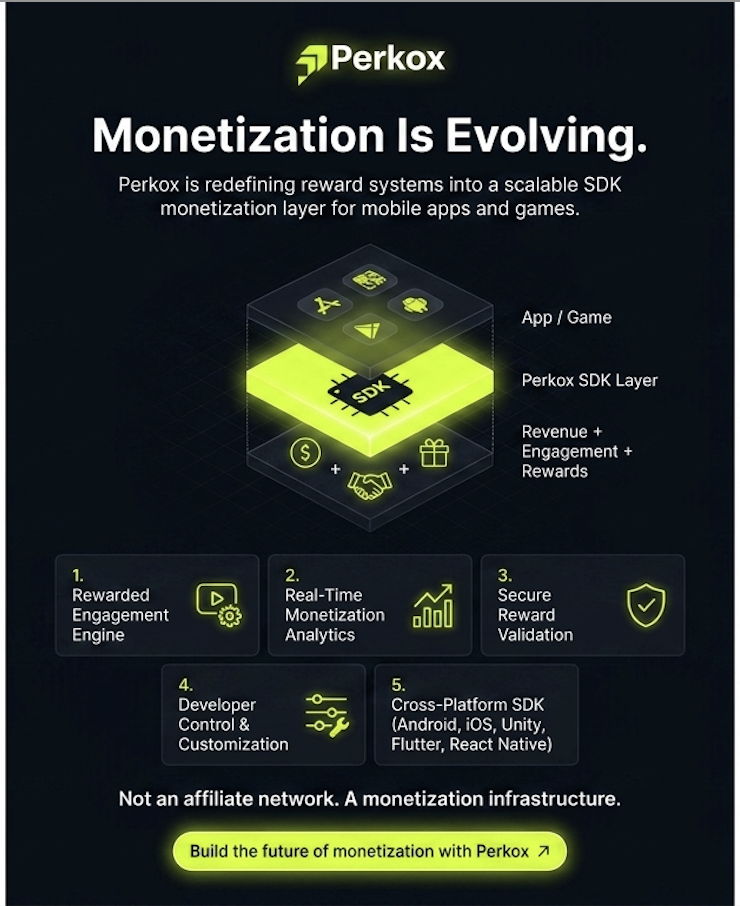
    That is why a growing number of studios are moving toward SDK-based monetization infrastructure platforms like Perkox.

    Instead of acting as “just another ad network,” Perkox is building a developer-first monetization operating system designed specifically for mobile games and apps.

    From rewarded engagement to real-time analytics and AI-powered optimization, the platform aims to help developers maximize ARPDAU while maintaining user retention and long-term growth.


    The Problem With Traditional Mobile Monetization

    For many years, monetization platforms focused on one thing:

    Show ads → generate impressions → increase revenue.

    But modern mobile ecosystems no longer work that way.

    Developers now face major challenges:

    • Higher CPI acquisition costs
    • Lower user attention spans
    • Increased SDK fraud
    • Ad fatigue
    • Privacy-first mobile ecosystems
    • Lower conversion rates
    • Poor retention caused by aggressive monetization

    Traditional ad SDKs often fail to optimize for:

    • User experience
    • Engagement quality
    • Long-term retention
    • Revenue diversification
    • Reward-based ecosystems

    As the mobile gaming market matures, developers need smarter monetization systems that integrate directly into gameplay and user journeys.

    That is exactly where SDK infrastructure platforms are becoming essential.


    What Is SDK Monetization Infrastructure?

    6

    SDK monetization infrastructure is the evolution of traditional mobile monetization.

    Instead of simply displaying ads, the infrastructure layer manages:

    • Rewarded monetization systems
    • Offerwall technology
    • Real-time optimization
    • Analytics
    • Security
    • Fraud prevention
    • Revenue orchestration
    • Cross-platform integrations

    Platforms like Perkox are positioning themselves as the backend monetization engine powering modern mobile apps and games.


    Why Rewarded Monetization Is Dominating Mobile Gaming

    Rewarded monetization has become one of the fastest-growing monetization categories in mobile gaming.

    Why?

    Because users prefer optional engagement over forced advertising.

    Modern players are more likely to engage with:

    • Rewarded offers
    • Optional tasks
    • Incentivized engagement
    • In-game reward systems
    • Progression-based monetization

    Instead of interrupting gameplay, rewarded monetization becomes part of the experience itself.

    According to gaming monetization trends, rewarded ecosystems continue outperforming aggressive ad models in retention and engagement metrics. (unity.com)

    Perkox focuses heavily on this approach through:

    • Offerwall monetization
    • CPI/CPE engagement systems
    • Reward-based infrastructure
    • Monetization layers optimized for non-paying users

    Real-Time Analytics Is Becoming the Core of Monetization

    7

    Modern developers need visibility into everything.

    That includes:

    • eCPM performance
    • ARPDAU trends
    • DAU & MAU growth
    • User engagement quality
    • Conversion performance
    • Reward completion rates
    • Revenue segmentation

    The future of monetization belongs to platforms that provide real-time optimization instead of static reporting.

    Perkox’s SDK infrastructure highlights:

    • Real-time monetization analytics
    • Performance dashboards
    • Revenue optimization tools
    • AI-powered data infrastructure

    For gaming studios, this means monetization becomes an intelligent system instead of a passive ad placement.


    Security Is the Next Big Battle in Mobile SDKs

    As mobile monetization grows, fraud becomes more sophisticated.

    Developers now face:

    • Fake installs
    • Spoofed rewards
    • SDK manipulation
    • Event injection
    • Bot traffic
    • Unauthorized SDK usage

    That is why SDK security is becoming one of the most important factors when choosing a monetization provider.

    Perkox is emphasizing:

    • Server-side verification
    • Secure SDK architecture
    • Anti-fraud infrastructure
    • Protected reward systems
    • Cloud-based validation layers

    This shift mirrors broader industry demand for secure monetization ecosystems built for long-term scalability.


    Cross-Platform SDK Ecosystems Are the Future

    The future of app monetization is cross-platform.

    Modern studios develop across:

    • Android
    • iOS
    • Unity
    • Flutter
    • React Native

    Developers no longer want fragmented monetization tools for every platform.

    They want:

    • Unified analytics
    • Centralized monetization
    • One SDK ecosystem
    • Shared infrastructure
    • Faster integrations

    Perkox’s new infrastructure strategy directly targets this demand by building a scalable SDK ecosystem designed for multiple development environments.


    Why Perkox Is Getting Attention in the Mobile SDK Market

    https://images.openai.com/static-rsc-4/mD1h9jLibAWKOV1RgHgp9klFnKlP_g_1KsrjTJT4E9TwIgBSrwdYHJ49iz_41LZjxaBT68UsqRcERJdOx_X4QBLfmlG7lo2Tr3SN3_h5aOPzityraIV00HOARtybzUNgkYvmB21ms8JxR9YAtgVbb25ZZ8-7pt4MU_5EVEqtwIZafl9QNMrhOuJ9_YBjb5Tq?purpose=fullsize

    7

    The mobile SDK market is crowded.

    But Perkox is differentiating itself through:

    • Developer-first positioning
    • SDK infrastructure focus
    • Rewarded monetization
    • Analytics-driven optimization
    • Security-first architecture
    • Cross-platform integrations
    • Modern enterprise branding

    The company is positioning itself closer to a monetization operating system than a traditional affiliate network.

    That positioning aligns strongly with where the industry is heading in 2026.


    The Future of Mobile Monetization

    The next generation of monetization will not be built around spammy ads or short-term revenue hacks.

    It will be built around:

    • Better user experience
    • Intelligent monetization systems
    • Real-time analytics
    • Rewarded ecosystems
    • AI optimization
    • Secure SDK infrastructure
    • Developer-first tools

    Platforms that understand this shift will define the next decade of mobile gaming monetization.

    Perkox is aiming to be part of that future.


    Explore Perkox


    Start Monetizing with Perkox

    Register as a Perkox publisher → — integrate the offerwall SDK and start earning from rewarded monetization. Read the documentation →

  • Offerwall SDK Integration Tutorial: A Step-by-Step Guide for Developers

    Offerwall SDK Integration Tutorial: A Step-by-Step Guide for Developers

    Cover Image
    “`html

    Offerwall SDK Integration Tutorial: A Step-by-Step Guide for Developers

    Estimated reading time: 8 minutes

    Key Takeaways

    In today’s competitive mobile app market, relying on traditional advertising methods like banner ads and interstitial ads isn’t always enough. Developers are constantly seeking diverse and effective ways to generate revenue and, crucially, keep users engaged. This is where offerwall monetization comes in. Offerwalls represent a high-potential strategy, allowing users to earn rewards within your app by completing specific actions. This tutorial will provide a comprehensive offerwall SDK integration tutorial to help you unlock this valuable revenue stream. Consider exploring networks like Perkox to maximize earnings and user engagement.

    What is Offerwall Monetization?

    Offerwalls are essentially lists of tasks or offers presented to users within your app. These offers can range from simple actions like watching a video or completing a survey to more complex tasks like installing another app or signing up for a service. Users are rewarded for completing these offers, typically with in-app currency, virtual items, or other benefits. It’s a mutually beneficial system – users get value, and developers get revenue.

    Why Use Offerwall Monetization?

    Let’s break down the benefits of using offerwalls:

    • Increased Revenue: Offerwalls can significantly boost your app’s earnings compared to standard advertising formats. They often have higher eCPMs (effective cost per mille).
    • Improved User Engagement: The reward system inherent in offerwalls encourages users to spend more time within your app, increasing retention. Users are motivated to return to earn more rewards.
    • Diversified Monetization: Don’t put all your eggs in one basket! Offerwalls provide a valuable alternative to, or complement to, in-app purchases and traditional advertising.
    • Higher User Retention: Users are more likely to stick around an app that offers tangible rewards.

    “Offerwalls are a fantastic way to tap into user time and engagement, creating a win-win scenario for both developers and users,” says [Digital Turbine](https://developer.digitalturbine.com/hc/en-us/articles/16093853731612-Offer-Wall-SDK-Changelog).

    Understanding Offerwall SDKs

    To integrate an offerwall into your app, you’ll need an offerwall SDK (Software Development Kit). But what exactly *is* an SDK? An SDK is essentially a toolbox provided by a service provider. It’s a collection of pre-written code, libraries, documentation, and tools that allow developers to seamlessly integrate specific functionalities into their applications. Think of it like building with LEGOs – the SDK provides the pre-made bricks (code) you need to construct a larger structure (the offerwall feature).

    How SDKs Enable Integration: Offerwall SDKs provide APIs (Application Programming Interfaces) that act as messengers between your app and the offerwall platform. These APIs handle crucial tasks such as:

    • Displaying Offers: Presenting a list of available offers to the user within your app’s interface.
    • Tracking User Completions: Monitoring when a user starts, completes, or cancels an offer.
    • Awarding Rewards: Automatically granting the appropriate in-app rewards to the user upon successful offer completion.
    • Reporting Data: Providing detailed analytics on offer views, completion rates, and revenue generated.

    Hosted vs. Self-Hosted SDKs: There are generally two types of offerwall SDKs:

    • Hosted SDKs: The offerwall platform manages the offer display, tracking, and related infrastructure on their servers. This is the most common and straightforward approach.
    • Self-Hosted SDKs: Developers are responsible for managing the offer display and tracking themselves. This offers more customization, it requires significantly more technical expertise and resources.

    Choosing the Best SDKs

    Selecting the right offerwall SDK is crucial for maximising revenue and ensuring a smooth user experience. Here are key criteria to consider:

    • Fill Rate: This is the percentage of times the SDK can successfully display an offer to a user. A higher fill rate means more opportunities for users to earn rewards and for you to generate revenue. Aim for SDKs with fill rates above 50%.
    • eCPM (Effective Cost Per Mille): Represents the revenue generated per 1000 offer impressions. Higher eCPMs translate to greater earnings.
    • Reporting & Analytics: Detailed data is essential for monitoring performance, identifying popular offers, and optimising your integration strategy. Look for SDKs that provide comprehensive reports.
    • SDK Size & Performance: A large SDK can increase your app’s size and negatively impact performance, especially on older devices. Choose SDKs that are lightweight and optimised for speed. Minimising latency is particularly important.
    • Compatibility: Ensure the SDK supports your target platforms (Android, iOS, and, if applicable, Unity).
    • Support & Documentation: High-quality documentation and responsive developer support are invaluable when you encounter issues or need assistance.

    Here’s a comparison of some top contenders:

    • PubScale: A comprehensive offerwall solution with a user-friendly dashboard. Integration involves adding Gradle dependencies, configuring ProGuard, and initializing the SDK in your main activity. API access requires your App ID and Publisher Key.
    • Digital Turbine (formerly Fyber): Part of a consolidated platform utilizing the FairBid SDK. Android uses `com.fyber.fairbid-sdk-plugin`, iOS uses `FairBidSDK`, and Unity uses `com.fyber.fairbid.unity` via the Unity Package Manager.
    • Paymentwall: Offers flexible integration, accepting integration through jCenter, GitHub cloning, or a direct AAR file download. It depends on appcompat-v7 and design libraries.
    • Adscend Media: Integrated using an Intent, requiring your Publisher ID, Offer Wall ID, and a unique user ID. Supports optional parameters like gender and age.
    • IronSource: Requires app setup on their platform prior to integration, including setting the ad unit to test mode and verifying integration on their testing page.
    • ayeT-Studios: Android SDK geared towards offerwall access and user reward implementation. Important to match your package name during setup.

    To boost user retention after integration, look into gamified monetization strategies and implementing loyalty rewards like daily tasks and streaks.

    Step-by-Step Integration Tutorial (PubScale Example)

    This section provides a general guide, followed by a specific example using PubScale.

    Phase 1: Prerequisites (Generic

    • Developer Account: Create an account on the chosen offerwall platform (e.g., PubScale, Digital Turbine). This will provide you with the necessary API keys and documentation.
    • Project Setup: Ensure your mobile app project is correctly set up in your preferred development environment (Android Studio for Android, Xcode for iOS, or Unity for cross-platform development).

    Phase 2: SDK Integration (PubScale Example

    1. Add Dependencies: Open your app’s `build.gradle` file (specifically, the `app` module). Add the following dependency:

    implementation 'com.pubscale:offerwall:latest_version' //Replace latest_version with the actual version

    2. Configure ProGuard (Android): If you’re building a release version of your Android app, you need to configure ProGuard to prevent code obfuscation from interfering with the SDK. Add the following rules to your `proguard-rules.pro` file:

    -keep class com.pubscale.** { *; }
    -keep interface com.pubscale.** { *; }
    -dontwarn com.pubscale.**

    3. Initialize the SDK: In your main activity file (e.g., `MainActivity.java` in Android), initialize the PubScale SDK:

    import com.pubscale.Offerwall;
    import android.os.Bundle;
    
    public class MainActivity extends AppCompatActivity {
    
    @Override
    protected void onCreate(Bundle savedInstanceState) {
    super.onCreate(savedInstanceState);
    setContentView(R.layout.activity_main);
    
    Offerwall.init(this, "YOUR_APP_ID", "YOUR_PUBLISHER_KEY");
    }
    

    Replace `”YOUR_APP_ID”` and `”YOUR_PUBLISHER_KEY”` with your actual credentials from the PubScale dashboard.

    Phase 3: Displaying the Offerwall (Generic

    1. Creating an Offerwall Instance: Instantiate the offerwall object in your code using the SDK’s provided methods. 2. Loading Offers: Call the SDK’s API to request and load available offers. This usually involves passing a callback function to handle the loaded offer data. 3. UI Integration: Incorporate the offerwall into your app’s user interface. This typically involves using a WebView or a custom view provided by the SDK to display the offers.

    Phase 4: Handling User Interactions (Generic

    1. Offer Selection: Track when a user selects an offer. This can be used for analytics and potentially for rewarding users with small incentives. 2. Offer Completion: The SDK will send a callback when a user successfully completes an offer. This is the critical moment for rewarding the user. 3. Reward Attribution: Implement the logic to accurately award the in-app reward to the user based on the offer completion callback. Ensure the reward is credited correctly and displayed to the user.

    Troubleshooting Offerwall Integration Issues

    Here’s what to do when things don’t go as planned:

    • SDK Not Loading: Verify dependencies, check initialization code for errors, ensure you have the correct permissions in your app’s manifest.
    • Offerwall Content Not Displaying: Confirm internet connectivity, check the SDK’s API logs for errors, and inspect your UI for potential conflicts.
    • Tracking Issues: Double-check user and offer IDs, verify the proper handling of offer completion callbacks.

    Frequently Asked Questions

    Q: How do I update the offers in my offerwall?

    A: The offerwall SDK will typically handle offer updates automatically. However, you may need to refresh the offer list manually in some cases.

    Q: What happens if a user cancels an offer?

    A: The SDK will track offer cancellations and provide data on cancellation rates. You can use this data to optimize your offer selection and improve user engagement.

    To boost user retention after integration, look into gamified monetization strategies and implementing loyalty rewards like daily tasks and streaks.

    “`


    Start Monetizing with Perkox

    Register as a Perkox publisher – integrate the offerwall SDK and start earning from rewarded monetization. Read the documentation

  • What Is an Offerwall? The Complete 2026 Guide for Mobile Developers

    What Is an Offerwall? The Complete 2026 Guide for Mobile Developers

    An offerwall is an in-app monetization interface that lets users complete sponsored tasks — installing apps, taking surveys, signing up for services — in exchange for virtual currency, premium content, or other in-app rewards. For mobile app and game developers, it is one of the most effective ways to monetize the 95% of users who never make an in-app purchase.

    This guide explains how offerwalls work, how they fit alongside IAP and ad networks, what to look for in an offerwall platform, and how to integrate one in under 10 minutes.

    What Is an Offerwall?

    An offerwall is a dedicated screen or overlay within an app that presents users with a list of rewarded tasks. Each task — called an offer — has a fixed payout. When the user completes the offer, the developer earns revenue and the user receives a reward in the app’s virtual currency.

    Think of it as a marketplace inside your app: advertisers pay to acquire users, the offerwall platform facilitates the transaction, and your users get rewarded for their time and attention — without spending real money.

    Key components of an offerwall

    • Offers: Sponsored tasks from advertisers. Common formats include CPI (app installs), CPA (sign-ups, form completions), CPE (engagement events), and surveys.
    • Virtual currency: The in-app reward users receive. This could be coins, gems, points, Robux, or any currency your app uses. The offerwall platform handles the exchange rate.
    • Reward callback (postback): A server-to-server notification that confirms a user completed an offer. This is how your app knows to credit the user’s balance — securely and fraud-free.
    • Offerwall SDK: The code library you embed in your app to render the offerwall UI, fetch available offers, and handle reward fulfillment.

    How Does an Offerwall Work?

    The offerwall monetization flow has four steps:

    1. The user opens the offerwall. They tap a button in your app — typically labeled “Earn Coins,” “Free Rewards,” or “Get More Currency.” The offerwall renders as a full-screen view or modal.
    2. The user completes an offer. They pick a task from the list — for example, installing another app and opening it once. The offerwall tracks the conversion through attribution links.
    3. The advertiser pays the platform. The offerwall provider receives payment from the advertiser for the completed action (e.g., $2.00 for a CPI install).
    4. The user gets rewarded. The platform sends a server-to-server postback to your app, confirming the completion. Your app credits the user’s virtual currency balance. You keep a share of the advertiser payout; the platform takes its cut.

    The entire process is automated. Once integrated, the offerwall runs without manual intervention — offers refresh automatically, rewards are validated server-side, and payouts are tracked in real-time analytics.

    Types of Offerwall Offers

    Offerwalls typically include several offer formats, each with different payout structures:

    Offer Type What the User Does Typical Payout Best For
    CPI (Cost Per Install) Installs and opens another app $0.10 – $3.00 High conversion volume, easy tasks
    CPA (Cost Per Action) Signs up, fills a form, makes a purchase $1.00 – $50.00 Higher revenue per conversion
    CPE (Cost Per Engagement) Reaches a specific level or milestone in an app $0.50 – $10.00 Quality engagement, retention
    Surveys Completes a market research questionnaire $0.50 – $5.00 Users who prefer non-app tasks
    CC Submit / Pin Submit Enters credit card for a trial subscription $5.00 – $40.00 Highest payouts, older audiences

    Most offerwall platforms aggregate thousands of offers from multiple demand sources, so users always have tasks available regardless of their geo or device. For a deeper breakdown of CPI and CPA mechanics, see our complete guide to CPI and CPA offerwall offers.

    Offerwall vs Other Monetization Models

    Developers often ask how offerwalls compare to other monetization formats. The short answer: offerwalls complement IAP, rewarded video, and banner ads — they don’t replace them.

    Model Revenue Source User Cost Best For
    IAP User pays real money $0.99 – $99.99 5% of users who pay
    Rewarded Video Advertiser pays per view 15–30 seconds Quick, passive engagement
    Offerwall Advertiser pays per action 1–10 minutes 95% of users who don’t IAP
    Banner / Interstitial Advertiser pays per impression Intrusive High-DAU apps with thin margins

    The key insight: offerwalls generate 10–50x more revenue per user than banner ads, and they capture the segment that rewarded video misses — users willing to spend 5 minutes on a survey but not 30 seconds on a skippable ad. For a detailed revenue comparison, read our offerwall vs rewarded video analysis.

    Why Offerwalls Work: The Economics

    The core economics are simple. 95% of mobile users never make an in-app purchase. That means the vast majority of your DAU generates zero revenue from IAP. Offerwalls monetize this dormant segment by giving them a way to “earn” premium content through their time and attention instead of their wallet.

    Here’s what the numbers look like for a typical mid-core game with 100,000 DAU:

    • IAP revenue: ~$500/day from 5,000 paying users (avg $0.10 ARPDAU)
    • Offerwall revenue: ~$120–300/day from non-paying users who engage with the offerwall (adds $0.012–0.03 ARPDAU lift)
    • Combined ARPDAU lift: +12% on average post-integration

    The exact numbers vary by genre, geo mix, and offerwall placement, but the pattern is consistent: offerwalls add a meaningful revenue layer on top of existing monetization without cannibalizing IAP. For genre-specific benchmarks, see our offerwall retention and revenue impact study.

    How to Integrate an Offerwall

    Integration is straightforward with a modern SDK. Here’s the general flow:

    1. Register and create an app

    Sign up at your chosen offerwall platform (e.g., Perkox publisher portal), add your app, and configure your virtual currency settings — name, exchange rate, and reward callback URL.

    2. Install the SDK

    Download the SDK for your platform. Most offerwall providers support Android, iOS, and Unity. Perkox additionally offers Flutter and React Native SDKs. For platform-specific guides, see our Android SDK tutorial and iOS SDK tutorial.

    3. Configure the postback URL

    This is the most critical step. The postback URL is where the offerwall platform sends server-to-server notifications when a user completes an offer. Your server receives the callback, validates it (checking signatures, user IDs, and duplicate transactions), and credits the user’s balance. For a complete walkthrough, read our offerwall postback configuration guide.

    4. Add the offerwall entry point

    Place a button or icon in your app’s UI — typically in the shop, store, or currency purchase screen. Label it clearly: “Earn Free Coins,” “Get Rewards,” or “Complete Offers.” The placement matters — for best practices, see our offerwall UX design principles and A/B testing placement guide.

    5. Test and launch

    Complete a test offer yourself, verify the postback arrives, and confirm the user balance updates. Once validated, push to production. Total integration time: under 10 minutes with a well-documented SDK.

    What to Look for in an Offerwall Platform

    Not all offerwall platforms are equal. When evaluating providers, focus on these criteria:

    Offer quality and fill rate

    The platform should aggregate offers from multiple demand sources to ensure high fill rates across all geos. Look for 1,000+ live offers and premium advertiser relationships. Low fill rate means users see empty offerwalls — which kills engagement.

    Server-side reward validation

    The platform must validate rewards server-side with hashed callbacks, device fingerprinting, and duplicate detection. Without this, you’re vulnerable to fraud — users claiming rewards for offers they never completed. Learn more in our SDK security best practices guide.

    SDK quality and platform coverage

    Look for lightweight SDKs with clear documentation, native support for your platform (not just wrappers), and active maintenance. If you’re building with Flutter or React Native, make sure the provider offers native SDKs — not just WebView bridges. Perkox is the only platform with native Flutter and React Native offerwall SDKs.

    Real-time analytics

    You need visibility into impressions, clicks, conversions, revenue, and ARPDAU — in real time, not 24-hour delayed reports. A good offerwall platform provides a dashboard with yield intelligence, geo breakdowns, and offer-level performance data. See our analytics metrics guide for what to track.

    Customization and branding

    The offerwall should match your app’s look and feel — colors, fonts, currency names, and UI elements. A generic, unbranded offerwall feels like an ad and hurts engagement. Learn how to customize in our design customization guide.

    Offerwall Best Practices for Developers

    Don’t replace IAP — complement it

    Offerwalls work best as a fallback for users who tap “Buy” but don’t complete the purchase. Show the offerwall as an alternative: “Don’t want to pay? Earn coins instead.” This captures revenue from users who would otherwise bounce.

    Place the entry point strategically

    The shop screen, currency purchase screen, and game-over screens are the highest-converting placements. Avoid burying the offerwall in a settings menu. For placement strategy, read our A/B testing guide.

    Balance your virtual economy

    Offerwall rewards should be calibrated so they don’t deflate the value of IAP currency. A common rule: offerwall earnings should take 3–5x longer than the equivalent IAP purchase. For economy design, see our economy balance guide.

    Use postback security

    Always validate postbacks server-side. Check for duplicate transaction IDs, verify the offerwall platform’s signature, and reject callbacks from untrusted IPs. Our fraud signals guide covers common attack vectors.

    Monitor offer quality

    Regularly review which offers convert best for your audience. If users complete a survey offer 5x more than CPI offers, your platform should let you weight demand sources accordingly. Use the publisher dashboard to track offer-level performance.

    Common Offerwall Mistakes to Avoid

    • Forcing the offerwall on users: Auto-popping the offerwall degrades UX and increases churn. Let users opt in.
    • Bad currency balance: If offerwall rewards are too generous, paying users feel cheated. Too stingy, and non-paying users ignore the offerwall.
    • Ignoring postback security: Without server-side validation, fraudsters will drain your virtual economy.
    • Poor placement: Hiding the offerwall behind three taps means nobody finds it. Put it where users already look for currency.
    • No offer diversity: If your offerwall only shows CPI offers, survey-preferring users bounce. Ensure your platform provides mixed offer types.

    Who Should Use an Offerwall?

    Offerwalls work across virtually every app category, but they perform especially well in:

    If your app has a virtual currency, a free-to-play model, and a significant non-paying user base, an offerwall will generate incremental revenue. For a full comparison of offerwalls across app types, read our offerwall for games vs apps analysis.

    Frequently Asked Questions

    Is an offerwall the same as rewarded ads?

    No. Rewarded video ads pay users to watch a 15–30 second video. Offerwalls pay users to complete more involved tasks — installing apps, taking surveys, signing up for services. Offerwalls typically generate higher revenue per engagement because the advertiser payout is larger for completed actions than for video views.

    Do offerwalls cannibalize IAP revenue?

    No — when implemented correctly. The key is currency balance: offerwall rewards should require more time investment than the equivalent IAP purchase. Most users who use the offerwall were never going to IAP in the first place. You’re monetizing a segment that was generating zero revenue. Studies show offerwalls add +12% ARPDAU on average without reducing IAP conversions.

    How much can I earn from an offerwall?

    Revenue depends on your DAU, geo mix, and engagement rate. Typical benchmarks: $0.01–0.03 incremental ARPDAU from offerwall engagement. For a game with 100,000 DAU, that’s $1,000–3,000/month in additional revenue. High-engagement reward apps can see significantly more. For detailed benchmarks, see our revenue impact study.

    How long does it take to integrate an offerwall SDK?

    With a well-documented SDK, integration takes under 10 minutes. You install the SDK, configure your currency settings, set up the postback URL, and add the entry point button. Most platforms provide step-by-step guides for each platform. See our Android, iOS, Unity, Flutter, and React Native guides.

    Are offerwalls safe for my users?

    Yes, when using a reputable platform. Look for platforms that vet all advertisers, comply with Google Play and App Store policies, and provide brand-safety controls. The platform should also support server-side reward validation to prevent fraud. Read our security best practices for more details.

    What’s the difference between an offerwall and a CPA network?

    An offerwall is the user-facing interface inside your app. A CPA network is the backend that sources and manages the offers. Some platforms offer both — the offerwall SDK for your app, and the CPA network that supplies demand. Perkox provides both as integrated infrastructure, so you don’t need separate vendors.

    Start Monetizing with Perkox

    Perkox is the developer-first offerwall platform with native SDKs for Android, iOS, Unity, Flutter, React Native, and Web. Server-side reward validation, real-time analytics, 1,200+ live offers, and integration in under 10 minutes.

    Register as a Perkox publisher → — integrate the offerwall SDK and start earning from rewarded monetization.

    Read the documentation →

    Related Articles

    Further Reading

    Related: Mobile App Monetization Strategies 2026

    Related: How Mobile Games Monetize: 2026 Revenue Guide

    Related: Future of Mobile App Monetization

    Related: AppLovin vs ironSource Comparison